
When it comes to implementing intelligence/language systems, crafting systems with intelligence and efficiency is critical. In this post, we will explore five of the foundational agentic AI design patterns that could be game changers in the construction of your AI applications. Each pattern is systematically illustrated from start till end with pertinent icons, tools, and resources to give a precise grasp on the concepts involved and to make it as engaging as one can. These patterns will help you build more intelligent and responsive AI systems in real-life, whether you are a developer, data scientist, or an AI enthusiast.

And to take your understanding even further, we also have affiliate links to top-rated courses on Udemy directly relate to each of these AI design patterns. Through taking these courses, you’ll learn more about these and other patterns in terms of practical approaches that you can use. Also, at the end of this post, we’ll go over some AI Agent Tools that will enable you to build amazing AI agents without needing to write code for everything from scratch — ideal for those who would rather get their hands dirty quickly!
Let’s dive in! 💡✨
1️⃣ Reflection Loop: The Power of Iterative Refinement 🔄
Step-by-Step Explanation:
- User Query 📝: For example, if a user asks an AI assistant, “What is the best way to improve my public speaking skills? This is the initial point of interface in which the user interacts with the system, as by asking a question or request.
- Use : Natural Language Processing (NLP) libraries (e.g., spaCy, NLTK) can be used to analyze and comprehend the user input.
- LLM (Generate) 💬: The AI processes this query and makes an initial guess. It can suggest reading books about public speaking, practicing in front of a mirror, joining Toastmasters clubs, for example. It shows the first draft of the answer the AI generates.
- How it Works: These responses can be generated using fine-tuned versions of GPT-3/4 or BERT models. Access is provided through platforms like Hugging Face.
- Iterate 🔁: But the AI doesn’t end there. It has an iterative way to think back to what its first response was. It may contemplate, “Have I thought of everything? “So if they have any better suggestions?” This is self-evaluation and improvement.
- The tool used: LangChain is an extremely useful framework for chaining multiple LLM calls, whether or not feeding them back with iterative refinement.
- LLM (Reflect) 🔄: Ideally during this reflection phase the AI is like, Wait a second, I should also mention online courses and tips for dealing with stage fright. It does this to improve the quality of its response.
- How : Similar to the Image to DALL-E pathway, Prompt Engineering techniques could be employed here to optimize the prompts being introduced to the model and drive better outputs.
- Reflected Output ✅: After reflection and adjusting parts of the individual response, the AI generates a second, better version personalized to the user. It now has a broad range of recommendations for enhancing public speaking abilities so that the user receives excellent counsel.
- Ideal Cases: Streamlit or Flask can both be used for building a user-friendly interface to display the final output.
Recommended Course: For those who want to explore Prompt Engineering and Iterative Refinement in-depth, enroll in this course on Udemy:
👉 Getting better at Prompt Engineering for AI models
2️⃣ The way patterns have been used on external resources 🔧
Step-by-Step Explanation:
- User Query 📝: For example, if a user asks, “What’s the weather forecast for New York tomorrow?” Thus, the pipeline would start with homing in on the said function of the tool, and using either Dialogflow or Rasa to map the natural language queries and extract intent.
- LLM (Generate) 💬: Most importantly, the AI either does not respond or responds with an irrelevant fact. The model you use: GPT-3/4 from OpenAI can help generating the first response based on user query.
- Tool Calling 🔧: As an example: The AI, understanding it requires explicit data, engages a weather API tool to pull the current forecast for New York. Use Case: Weather info Tool: You can use WeatherAPI or OpenWeatherMap to get real-time weather updates.
- Vector Database 🗂️: In case AI has saved previous weather records in vector database, it may refer this data and provide more accurate predictions. Tools Used: Most common databases Pinecone or Milvus can be utilized for storing and retrieving the data of history.
- Response ✅: With the data from the weather API and any relevant stored information, AI gives an accurate and up-to-date weather forecast for New York. Tool Used: React. js or Vue. js to create an animated frontend to show more readable weather forecast.
Recommended Course: To learn about API Integration and Data Handling, see this on Udemy:
👉 Developing AI Apps with APIs and data integration
Related Post : How to Use Deepseek AI to Write a Business Plan? Example: Template & Prompt Inside
3️⃣ ReAct Pattern (Reason and Act) 🤔⚙️
Step-by-Step Explanation:
- User Query 📝: Here’s how, for example, a user will ask, “How do I plan a trip to Paris? Alternatively, Rasa or Dialogflow can also be used to extract the user’s intent and entities such as destination and preferences.
- LLM (Reason) 🤔: Explain the process of planning a trip. Tool Used: You need to work with LangChain to chain various reasoning steps together.
- Action ⚙️: The AI, using its line of reasoning, chooses to search for information on flights, hotels, and tourist attractions in Paris. (Which tool to use: Flight and hotel information can be fetched using SerpAPI or Google Places API)
- Result 📊: A chartered flight to Paris, single-occupancy boutique hotel recommendations, must-see attractions, all in a simple list form. Another Tooling: The compiled data can be visualized using Tableau or Power BI cud be used to present the data in response to user query in a interactive dashboard
- Environment 🌍: Output: The AI can now provide the user with the information needed to plan their trip. What you can use: Mobile app to show the trip planner using React Native or Flutter
Recommended Course: Here is a Udemy course on AI Reasoning and Action Planning if you want to explore more on these topics:
👉 Developer Access to Reasoning and Decision Making with AI
4️⃣ Planning Pattern: Time Management of Action Items for Tasks 🕒📋
Step-by-Step Explanation:
- User Query 📝: Example: If you were to ask, What is the most efficient way of manage with my project deadlines?
- Tool Used: Jira API or Trello API to manage tasks and deadlines
- Planner 🕒: The AI starts by segmenting the project into smaller tasks, and attaches deadlines to each.
- Built Information: Structured format for tasks and deadlines.
- Generated Tasks 📋: It builds an in-depth task list with specific actions and deadlines for each.
- Automate the Creation of Tasks with Zapier or Make (formerly Integromat)
- Execute Single Task 🏃♂️: The AI does one thing, then the next — It ensures to accomplish one task before another, doing it in a thorough manner.
- Example of tool: Python scripts or Node js is capable of executing tasks through programming.
- Finished? 🎯: Final confirm: It marks that the project is done and shows the output once all tasks are done
- Tool Used: Slack API or Microsoft Teams API can be used to notify when the project is completed
Recommended Course: Learn Project Management with AI, this course is available on Udemy:
👉 How AI-Driven Project Management Works From A to Z
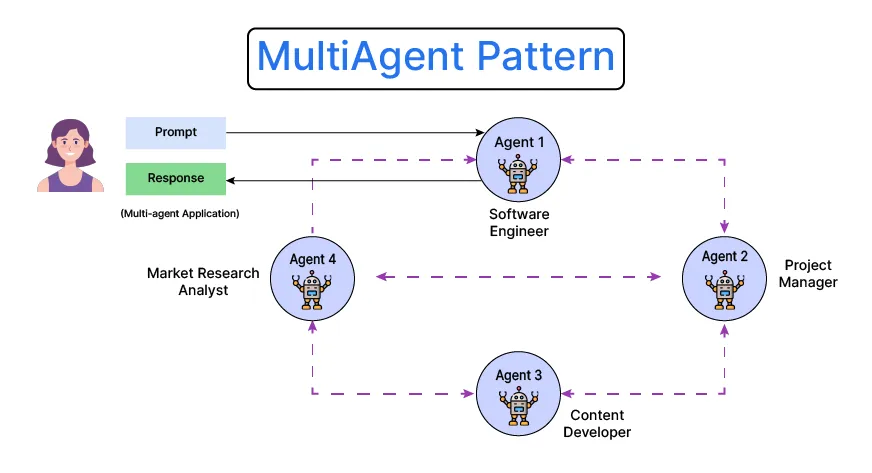
5️⃣ Multi-agent pattern: collaborative problem-solving 👥
Step-by-Step Explanation:
- User Query 📝: And here is a breakdown of a detail: A user wants to know: “How to optimize a software development process?” Also Useful: Dialogflow or Rasa in order to parse the user query and delegate tasks to different agents.
- PM Agent 👩💼: The PM agent: This agent coordinates all the other agents involved in the process
- The Tool Used: Asana API or Monday It shows how you can control workflows for projects using the com API.
- DevOps Agent 🛠️: The DevOps agent ensures that the deployment of the software is smooth and that the integration is continuous.
- Tool Used: CI/CD pipelines can be based in Jenkins or GitHub Actions.
- Tech Lead Agent 👨💻: Tech lead agent: The tech lead agent continues on the project through the development process and beyond, providing technical oversight and expertise as needed.
- Tools: CodeGPT or Codex for code review and making technical decisions
- SDE Agent 💻: Explanation of the SDE Agent: The SDE agent primarily executes writing high-quality code according to the project specifications.
- Coding Acceleration Tool: Microsoft Visual Studio Code + GitHub Copilot
- Delegation 👥: As you can infer from the above, every agent has a role to play and they work together to accomplish the shared goal of improving the software dev process.
- Encountered: Kubernetes or Docker can be used to deploy multi-agent systems in a distributed environment.
Recommended Course: Learn about Multi-Agent Systems and Collaboration by taking this course on Udemy:
👩🔧 Developing Multi-Agent AI Systems to Tackle Complex Challenges
Bonus: AI Agents Tools to Use Right Away 🛠️
If you want to bypass the learning curve and go directly into building AI agents, there are a number of tools that enable you to build really powerful AI agents without requiring you to code every single thing yourself. Now, let us discuss some of the top AI Agent Tools that can be accessed instantly:
- AppSumo AI Agents: AppSumo has several AI tools available that can assist to develop personalized AI representatives for different applications such as customer service and article creation.
👉 AppSumo AI Agents - AgentGPT: Create autonomous AI agents which can perform tasks, make decisions, and even communicate with other agents using AgentGPT.
AgentGPT - AutoGPT: This is an open-source project that lets you create your own AI agents that can do tasks on their own, like write code, generate reports, and so on.
AutoGPT - LangChain: LangChain is a framework for developing applications powered by language models. Its useful for developers looking to create bespoke AI workflows.
Link: LangChain
Conclusion 🌟
The 5 Agentic AI Design patterns: Reflection, Tool Use, ReAct, Planning, Multi-agent, provide not only powerful ways to create smarter and more responsive AI, but also opportunities to flexibly combine and compose them. When you act on these principles, you’ll effectively engineer AI programs that go above and beyond what users have come to expect. These patterns lead to a smarter, brighter future, whether it is in the form of refining iterations, using external inputs, performing tasks strategically, or solving problems together.
You can also take up the suggested courses above in order to help you advance your skillset. They will teach you the patterns in detail and give you practice and hands-on experience in applying them. Or, if you’d like to have a working solution to iterate on faster, check out the AI Agent Tools listed above to start building powerful AI agents without needing to write all the underlying code from scratch.
Thus, follow these patterns to reap the full benefits from the AI! 🚀✨


Leave a Comment